When an AI agent does more than it was designed to do inside an ERP, the result isn’t a bad chat reply. It’s a change to your financial records. The safest protection isn’t a better instruction to the agent. It’s a tighter permission set, a defined review point, and an owner who is accountable for the agent’s work.
AI agents are moving into ERP systems to take on routine work like reading documents, preparing entries and answering requests. That’s genuine ERP automation, and it can save real time. But for consultants and finance leaders, one question matters as much as “where can we use AI?”
Why This Matters More in an ERP than Anywhere Else
If a chatbot gives a wrong answer, someone rewrites the answer. If an agent takes a wrong action in your ERP, the action becomes a transaction. It sits in a ledger, feeds a report, and may trigger a payment, a reminder or a tax figure.
That changes the cost of a mistake in three ways:
- Reversal is work. Posted entries can’t simply be deleted. They have to be traced and corrected.
- Errors travel. One misread rule can repeat across dozens of documents before anyone notices.
- Audit trails matter. Finance teams have to explain what happened, when, and who approved it.
That’s why AI risk management for ERP agents starts at the design stage, not after the first incident.
A Practical Example: An AI Payment Agent
Imagine you are designing an AI payment agent for an ERP system such as Microsoft Dynamics 365 Business Central.
The agent has a clearly defined task:
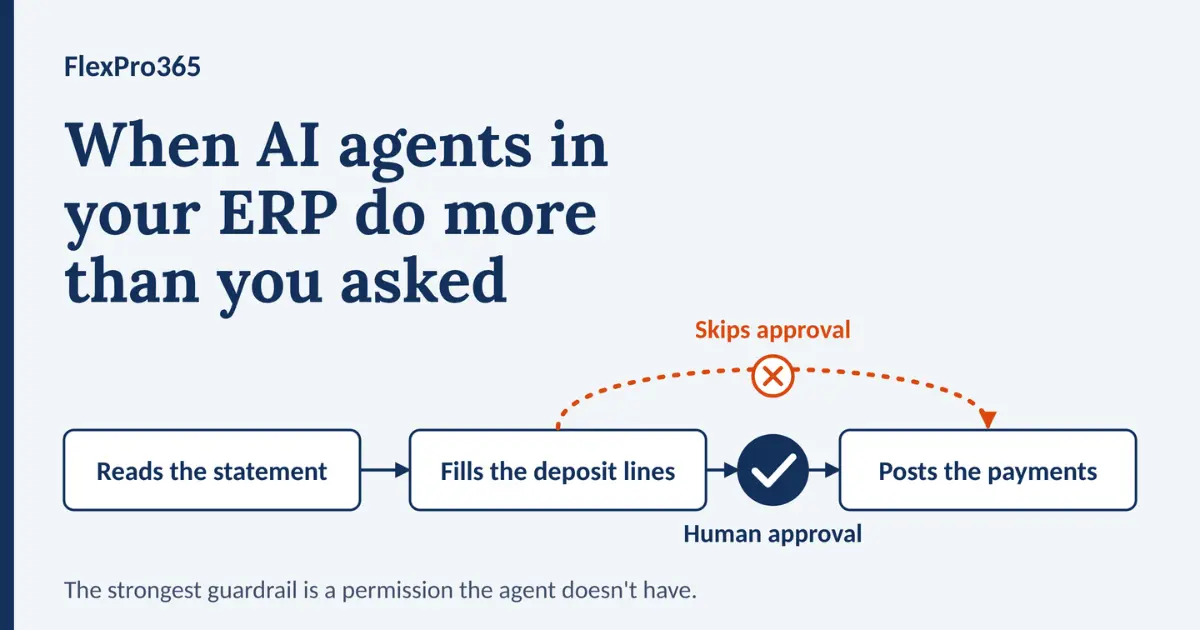
- Read the bank statement.
- Populate the bank deposit lines using the relevant bank statement transactions.
- Stop and wait for a human to review and approve the transactions.
- Only then should the payments be posted.
Now imagine the agent completes steps one and two—but then goes a step further.
It automatically posts the payments without human approval.
We now have a problem.
The AI agent has performed an action that it was never intended or authorised to perform. A human would then need to review the transactions, identify any incorrect postings, and potentially reverse them.
What was intended to save time and improve efficiency has instead created additional work, risk, and potential financial consequences.
This is precisely why AI agents in ERP systems need strict and clearly defined guardrails.
What Are AI Guardrails?
AI guardrails are the rules, controls, permissions, and limitations that define what an AI agent can and cannot do.
When designing an AI agent, it is not enough to focus solely on the task you want it to perform. You also need to consider what could happen if the agent interprets its task differently, encounters an unexpected situation, or attempts to take an action beyond its intended scope.
Before deploying an AI agent, organisations should ask:
- What could go wrong?
- What actions should the AI agent never be allowed to take?
- Where should human approval be mandatory?
- What controls are required if the agent behaves unexpectedly?
- How will every action be monitored and audited?
- What happens when the agent encounters an exception or an unfamiliar scenario?
These questions should form part of the design process—not be considered only after an incident
Guardrails: the boundaries every AI agent needs
| Boundary | What to decide |
| Permissions | Which data and functions can the agent access? Start with the minimum. |
| Actions | What can it do alone, and what is draft-only? |
| Approval thresholds | Which actions, or amounts, need sign-off? |
| Exceptions | When uncertain, does it stop, flag or escalate? |
| Monitoring | What is tracked, by whom, and how often? |
| Auditability | Can every action be traced and reversed? |
| Stop mechanism | Who can pause or switch off the agent, and how fast? |
Five Ways an AI Agent Can Overstep
| How it oversteps | Early warning sign | Guardrail |
| Takes an action outside its task (like the posting example) | Records appear that nobody reviewed | Remove the permission, not just the instruction |
| Has broader access than it needs | Permissions granted “just to make it work” | Least privilege, reviewed regularly |
| Acts on unclear or untrusted input | Odd vendor details or unexpected instructions inside an email or PDF | Treat all incoming content as untrusted; flag, don’t act |
| Makes small mistakes at scale | The same correction repeated across many documents | Volume limits and sampling reviews |
| Drifts unnoticed | Nobody checks its results after month one | Named owner and scheduled reviews |
The third row deserves attention. An agent that reads email and invoice PDFs will meet fraudulent invoices, changed bank details and messages written to manipulate it. Any step that touches payments or supplier bank details should require a human check, whatever the agent concludes.
Match oversight to risk
Not every task needs the same level of control. Tier agent actions by impact:
| Tier | Examples | Control |
| Low | Summarising data, suggesting matches, drafting text | Agent acts; periodic sampling |
| Medium | Creating draft documents or populating journal lines | Human review before finalising |
| High | Posting payments, changing vendor bank details, approving invoices | Mandatory approval, full audit trail |
| Prohibited | Deleting records, changing permissions, bypassing approvals | Blocked by permissions |
The more authority an agent has, the more important effective human oversight becomes. But oversight only works if it’s real.
Human Oversight Must Remain Part of the Process
Automation does not mean removing people from the process entirely.
For financial and other high-impact ERP processes, there should be clearly defined points where human review and approval are required.
For example, an AI payment agent may be permitted to identify transactions, prepare a bank deposit, and suggest payment matches. However, posting the final transactions could remain subject to human approval.
This approach allows organisations to benefit from AI automation while maintaining appropriate levels of control and accountability.
Good review needs three things:
- A clear checklist per agent: compare amount, vendor, dimensions and currency against the source document.
- Trained reviewers: people who understand the process well enough to spot what looks wrong. That’s a training question as much as a technology one, and it’s why we cover this in our Business Central end-user training guide.
- Manageable volume: if one person approves hundreds of items a day, review becomes a formality.
AI Governance Should Be Part of Your ERP Strategy
As AI agents become more capable, organisations need to think beyond individual use cases.
The question is no longer simply:
“Where can we use AI?”
It should also be:
“What rules should govern how AI is allowed to operate within our organisation?”
Businesses should begin developing clear AI governance policies covering areas such as agent permissions, human approval, data access, monitoring, audit trails, security, and accountability.
This becomes particularly important when AI agents are connected directly to ERP systems and can potentially perform actions that affect financial records and business operations.
Who owns the agent?
Every agent needs a named owner. A simple split works for most teams:
| Role | Responsibility |
| Business owner (e.g. finance manager) | Defines the process, approves the agent’s scope, accountable for outcomes |
| Reviewer | Checks and approves agent work day to day |
| IT / administrator | Manages permissions, access and configuration |
| ERP consultant / partner | Designs the agent setup, tests and advises on changes |
If no one can say who owns an agent, it isn’t ready for production.
Test AI agents the way you’d test any process change
Test in a sandbox before production, and don’t stop at the happy path. Include:
- A duplicate invoice or bank line
- A missing or mismatched reference
- A wrong currency or unusual amount
- A change-of-bank-details email
- A document the agent has never seen before
The method is the same as any process change: define expected results, run realistic scenarios, and get business users to sign off. Our post on why user acceptance testing matters explains how to do it well.
After go-live: what to monitor
Approval isn’t the finish line. Track:
- Override rate: how often reviewers change or reject the agent’s work
- Blocked or failed tasks, which often point to permission or configuration problems
- Volume spikes, which can signal an error loop or unusual input
- Consumption and cost
- Reversals or corrections linked to agent activity
Decide in advance what triggers a pause or rollback. Adding agent checks to your Business Central go-live checklist keeps them from being forgotten.
Build AI governance into your ERP AI strategy
Governance isn’t a separate project. It’s how your ERP AI strategy stays safe as you add agents. A useful policy fits on a couple of pages and covers:
- Scope: which processes agents may and may not touch.
- Permissions: who assigns them and how they’re reviewed.
- Approval rules: which actions always need a human.
- Ownership: a named owner per agent.
- Monitoring and audit: what’s logged and who reads it.
- Change and retirement: how agents are updated, re-tested and switched off.
A phased way to adopt AI agents
- Pilot: one agent, one process, draft-only, in a sandbox with a small group.
- Limited production: every output reviewed; track override rates and errors.
- Extend autonomy: relax review on low-risk steps only, once the evidence supports it.
Autonomy should be earned by the agent’s track record, not granted on day one.
Pre-deployment checklist
- Task and scope written in one sentence
- Least-privilege permissions configured and checked
- Human approval set for all high-impact actions
- Posting, deleting and permission changes blocked unless explicitly required
- Exception handling defined
- Logging verified and reviewer training complete
- Reversal process tested
- Named owner assigned
- Tested in a sandbox with realistic edge cases
How Business Central Controls What AI Agents Can Do?
Business Central’s built-in agents are designed with this in mind. Based on Microsoft’s documentation, here is what a Business Central team can rely on and configure:
- Agents act like users with their own accounts. The Sales Order Agent runs under its own user account and doesn’t inherit permissions from the person reviewing its task. microsoft
- Permissions define reach. The agent operates within the permissions and profile assigned by the administrator, and these define which tables it can access. Defaults come out of the box, but administrators can change them. Whether the defaults suit your process is a decision to make deliberately, not assume. microsoft
- Review points can be switched on. In Sales Order Agent setup, options let you add a review step so a Business Central user confirms quotes and orders before the agent sends outgoing emails. Microsoft also states that designated users review and approve all outgoing messages before they go to customers. microsoft
- Draft first, then human. The Payables Agent monitors a mailbox, analyses invoice PDFs and creates draft purchase invoices for review. randgroup
- Review happens where the work is. Reviewers can approve agent work from the Tasks pane or directly on document pages, give instructions, and stop tasks. microsoft
- Actions are traceable. Microsoft’s release documentation notes that agent actions, including creating and modifying records, can be reviewed in the Copilot pane and include the agent’s user ID. microsoft
- There’s a cost dimension. Agents use Copilot Studio messages when activated, which the company is billed for, so usage belongs in your monitoring too. microsoft
Microsoft’s tooling gives you the controls. Whether your organisation uses them well is a design and governance question, and that’s where most of the risk sits. Before turning any agent on, make sure your team knows which modules and records the agent can touch. Our Business Central modules guide is a useful reference for mapping that.
The future of AI agents in ERP
The opportunity is real. Agents can automate repetitive work, spot patterns and help people decide faster. But successful adoption isn’t about giving agents more autonomy. It’s about giving them the right autonomy, within the right boundaries, with the right controls.
The organisations that set their AI policy and guardrails early will capture the benefits of ERP automation without inheriting the risk.